

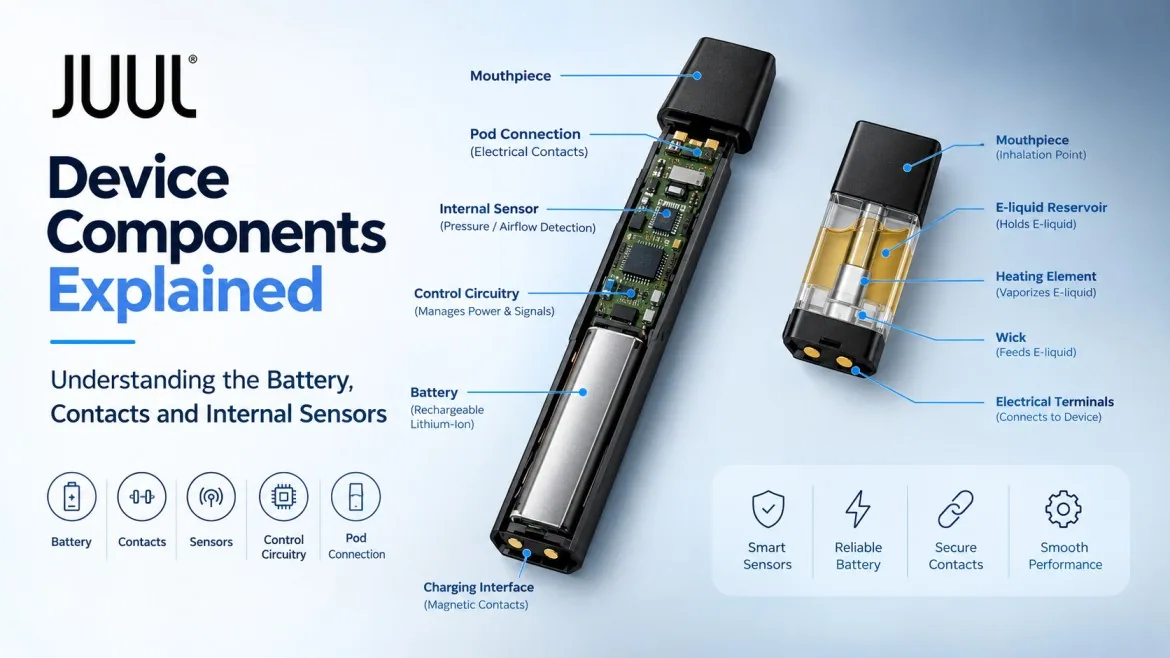
Hold a JUUL device in your hand and the first thing you notice is that there is almost nothing there. No buttons, no ports, no visible seams. It feels more like a USB stick than a piece of electronics. But that minimal exterior is doing a lot of work to hide what is actually a well-engineered set of components working together every time you take a puff. For vapers in Dubai, Abu Dhabi, and across the UAE who rely on this device daily, understanding what is inside it changes how you read its behavior and how you look after it.
This guide covers the main JUUL device components in straightforward language. Not an engineering manual. Just a clear explanation of what each part does, how it connects to the others, and what happens when one of them is not performing as it should.
The Battery: Everything Starts Here
What Kind of Battery Is Inside
The JUUL device runs on a rechargeable lithium-ion battery integrated into the main housing. It is not removable or replaceable by the user. Lithium-ion is the same chemistry used in smartphones, which gives you a sense of why it works well in something this compact. It stores a meaningful amount of energy in a small space and handles repeated charge and discharge cycles without needing much attention from you.
Battery capacity determines how long the device runs between charges. When you notice your JUUL Silver device needing a top-up more often than it used to, natural battery capacity reduction is usually the starting point for understanding why.
How Heat Affects Your Battery in the UAE
Lithium-ion batteries degrade faster when they are exposed to sustained heat. That is a problem everywhere but it is a more immediate concern in the UAE where summer temperatures regularly exceed 40 degrees. Leaving a JUUL device in a parked car, on a windowsill, or in direct sun for extended periods does measurable damage to the battery over time. The degradation shows up as a shorter runtime between charges and, eventually, as a device that cannot hold meaningful charge at all.
Storing the device at room temperature and keeping it out of hot environments is the single most practical thing you can do for battery longevity. The guide on JUUL 2 battery performance in UAE heat covers what this looks like in real daily use and what difference proper storage actually makes.
Battery Management and What It Does Automatically
Battery management functions built into the control circuitry regulate how the battery charges and discharges, protecting it from overcharge and excessive draw-down automatically. The LED indicator communicates battery status back to you, which is covered below.
Electrical Contacts: The Physical Connection Points
What Contacts Are and Where They Sit
Electrical contacts are the metal surfaces that allow current to flow between components. On a JUUL device there are two sets that matter in everyday use. The first connects the pod to the device body when a pod is inserted. The second connects the device to the charging dock. Both need to be clean, undamaged, and properly aligned for the device to work correctly. When either set has a problem, the symptoms can look similar even though the cause is in a completely different place.
The pod contacts sit at the insertion end of the device. When the pod slides in, its terminals line up with these contacts and the electrical circuit is complete. Power can then flow from the battery through to the heating element inside the pod. It is a simple physical connection but it is the one that breaks down most often in everyday use, usually from residue rather than any mechanical fault.
Keeping Contacts Clean and Why It Matters
E-liquid residue accumulates on contact surfaces over time. Even a thin film can reduce the quality of the electrical connection and produce inconsistent results. A pod that seems properly inserted but is not firing reliably is often a contact issue rather than a fault with the pod or the battery. Cleaning the accessible contact surfaces with a dry cotton swab resolves this more often than people expect.
JUUL’s own guidance specifically advises against using liquid cleaners and against opening the device. Moisture near the contacts can cause temporary connection failures and, if it reaches the internal electronics, more lasting damage. The JUUL cleaning guide covers how often to clean and exactly what to do without risking damage to the device.
What Typically Interrupts an Electrical Connection
- Residue from e-liquid or handling accumulating on the contact surfaces
- Moisture exposure affecting the contact area or the circuitry behind it
- Physical wear on the contact surfaces from repeated pod insertion over time
- A pod not being fully seated and therefore not making contact properly
- Damage to the contact surface from drops or mechanical pressure
The Pod Connection System: How the Cartridge Integrates
The Pod as a Separate Component
The pod is not part of the device hardware. It is a replaceable cartridge that contains its own set of components: an e-liquid reservoir, a heating element, a wick, a mouthpiece and electrical terminals at the base. The device provides the power and control. The pod provides everything involved in actually producing vapour. When the pod is empty or past its useful life, you replace only the pod. The battery, sensor and control circuitry all stay in the device.
If your device is firing correctly but vapour is weak or the flavour is off, the issue is almost certainly the pod. If the device is not firing at all, the issue is more likely in the device itself or the connection between the two. The guide on JUUL 2 pod connection problems walks through what to check when the device is not detecting a pod correctly.
Fit, Alignment and Compatibility
The pod is designed to seat firmly with a specific alignment. A pod that is not fully inserted will not make proper contact with the device terminals. The results look the same as a dirty contact issue: no firing or inconsistent firing. Pods that have been damaged or stored badly may not seat correctly regardless of how carefully you insert them.
Pod compatibility is also a practical consideration. Original JUUL pods are designed for the original JUUL device. JUUL 2 pods are for the JUUL 2. They are not interchangeable. If you are using a JUUL 2 Slate Grey device, you need JUUL 2 compatible pods. Using the wrong pod for the device generation is a common source of connection issues that has nothing to do with either product being faulty.
Internal Sensors: How the Device Knows You Are Inhaling
Draw Activation and the Sensor Behind It
There is no button on a JUUL device. You inhale and it fires. That automatic response is made possible by a pressure or airflow sensor inside the device that detects the change in air pressure or flow associated with a draw. When you inhale through the mouthpiece, the sensor picks up the change and sends a signal to the control circuitry, which then delivers power from the battery to the pod’s heating element. The whole sequence happens fast enough that vapour production feels immediate.
This sensor-based activation is described in technical research on the original JUUL hardware. The exact design may vary between generations but the principle of inhalation-triggered firing without a button is consistent across the product line.
When Sensor Performance Changes
If the device starts firing without being inhaled, or stops responding to draws reliably, the sensor is often involved. Moisture is the most common cause of unexpected sensor behaviour. Condensation from vaping, humidity, or e-liquid exposure near the sensor area can affect how it reads pressure changes and produce results that feel random or inconsistent. The JUUL device not hitting troubleshooting guide covers what to check when the device stops responding and what can usually be done about it without opening the hardware.
The Electronic Control Circuit: Managing Everything Inside
What the PCB Does
A printed circuit board inside the housing acts as the electronic management centre. It receives the sensor signal, manages power delivery, coordinates the LED and applies battery protections. Every electrical function in the device passes through or is managed here.
Rather than sending raw battery voltage to the heating element, the circuit regulates output so the device behaves consistently at different charge levels. Vapour quality should feel similar whether the battery is freshly charged or nearly empty.
How the Circuit Handles Pod Detection
When a pod is inserted and contacts are aligned, the circuit recognises the connection and prepares the device. It also signals the LED during charging and manages the charge rate. Most of what the device does automatically is coordinated here.
The LED Indicator: Reading What the Device Is Communicating
What Different LED Behaviours Mean
The LED is the only way the JUUL device has to communicate its status to you. No screen, no audio, no buttons, so every piece of status information the device has to share comes through this single indicator. Understanding the basic patterns is genuinely useful and saves a lot of guesswork when the device starts behaving unexpectedly.
On the original JUUL device, a pulsing white light typically means it is charging. A solid green indicates a full charge. Different coloured lights or blink patterns communicate battery level during use. On the JUUL 2, the patterns are different and include additional signals not present on the original device. The full guide to decoding JUUL lights including yellow, red and party mode covers what each pattern means and when to be concerned about an unusual signal. For JUUL 2 specific patterns, the JUUL 2 flashing lights guide is the more relevant reference.
The Charging Interface: Getting Power Back In
How the Original JUUL Magnetic Dock Works
The original JUUL device charges through a magnetic USB dock rather than a standard plug-in port. The dock attaches to the base of the device and holds it in place through magnetic alignment. This keeps the charging contacts properly positioned without requiring the user to line up a connector precisely. The dock connects to any USB power source and the device charges while sitting in it.
The magnetic design reduces mechanical wear compared to repeated plug-in connectors. The guide on JUUL charging time and common mistakes in the UAE covers what affects charging speed and what to avoid.
JUUL 2 Charging
The JUUL 2 uses a different charging arrangement from the original magnetic dock. If you have recently moved from the original JUUL to a JUUL 2, such as the JUUL 2 Starter Kit available in Dubai, the charging accessory is not interchangeable with what you used before. Using the correct charging accessory for your specific device model is important. An incompatible accessory will either deliver no charge at all or behave unpredictably.
What Is Inside the Pod
The Pod’s Main Components
The pod handles everything to do with vapor production. The main components inside are the e-liquid reservoir, wick, heating element, mouthpiece and the electrical terminals at the base that connect to the device. The reservoir holds the pre-filled e-liquid. The wick draws that liquid to the heating element by capillary action. The heating element is a coil that receives power from the device and heats the liquid to produce vapor. The mouthpiece channels the vapor to you.
As the e-liquid level drops, the wick has less to draw from and can produce weaker or slightly burnt-tasting vapor near the end. The guide on how pod age affects flavour and vapour production covers when it makes sense to replace a pod before it is technically empty.
Which Pods Are Available in the UAE?
Pods Xpress carries a range of JUUL 2 pod flavors for UAE vapers. Tobacco options include the Virginia Tobacco JUUL 2 pod and the Autumn Tobacco JUUL 2 pod. For menthol and cooling profiles, the Crisp Menthol JUUL 2 pod and the Polar Menthol JUUL 2 pod cover different points on the cooling intensity scale. For fruit options, the Mango JUUL 2 pod and the Watermelon JUUL 2 pod are consistently popular across the UAE market.
How All the Components Work Together
| Component | Primary Function | Located In |
|---|---|---|
| Battery | Stores and supplies electrical energy | Main device body |
| Electrical contacts | Establish connections between the device, pod and charger | Device and pod interface |
| Internal sensor | Detects inhalation and triggers activation | Main device body |
| Control circuit | Manages power delivery, battery protection and component coordination | Main device body |
| LED indicator | Communicates battery and device status visually | Main device body |
| Charging interface | Connects the device to a power source for recharging | Base of main device body |
| Pod heating element | Heats e-liquid to produce vapour when powered | Replaceable pod |
| Pod wick | Draws e-liquid to the heating element | Replaceable pod |
In a normal session: you inhale, the sensor detects the draw, signals the control circuit, the circuit delivers battery power through the pod contacts to the heating element, the element heats the liquid on the wick, and vapour is produced. Every link in that chain needs to be working for the result to feel right. When something is off, tracing back through that sequence usually identifies where the problem sits.
Original JUUL vs JUUL 2: Key Component Differences
| Feature | Original JUUL | JUUL 2 |
|---|---|---|
| Battery system | Rechargeable lithium-ion | Rechargeable lithium-ion |
| Pod compatibility | Original JUUL pods only | JUUL 2 pods only |
| LED feedback | White and green charging indicators | Additional patterns and status signals |
| Charging | Magnetic USB dock | Model-specific charging accessory |
| Activation | Draw-activated via internal sensor | Draw-activated via internal sensor |
Pod compatibility and charging accessories are not interchangeable between models. The full comparison of JUUL vs JUUL 2 for UAE buyers covers these distinctions if you are deciding between devices or have recently switched.
Frequently Asked Questions
What are the main components of a JUUL device?
The main components are a rechargeable lithium-ion battery, electrical contacts for the pod and charging connections, an internal pressure sensor, an electronic control circuit and an LED indicator. The heating element and e-liquid are inside the replaceable pod rather than the main device body.
Does a JUUL device have an internal pressure sensor?
Technical research on the original JUUL hardware describes a pressure sensor that detects puff-related changes and triggers activation. The exact design may vary between device generations.
What is the purpose of JUUL electrical contacts?
The contacts establish the electrical connections between the device body and the pod, and between the device and the charging accessory. Clean, properly aligned contacts are essential for consistent performance.
Where is the heating element in a JUUL?
Inside the replaceable pod, not in the main device housing. This is why pods are replaced when they run out or degrade while the main device continues to be used.
What does the LED indicator communicate?
Battery level, charging status and certain device conditions. The specific patterns differ between the original JUUL and JUUL 2.
Can you open a JUUL device to inspect the components?
JUUL does not recommend opening the device or pods. Internal components are not designed for user access. If the device is behaving abnormally, check the accessible contacts and pod connection first before stopping use.
Are original JUUL and JUUL 2 components interchangeable?
No. They share the same fundamental architecture but differ in pod compatibility and charging accessories. Do not use original JUUL pods in a JUUL 2 device or vice versa.
